
AI Assistant for Airbnb Hosts
The Guest Guide is an AI assistant for Airbnb hosts. You provide information about your rental and share a chat link. Guests can ask questions about their stay in their own words, and the assistant uses your property notes to answer.
Create your guest assistant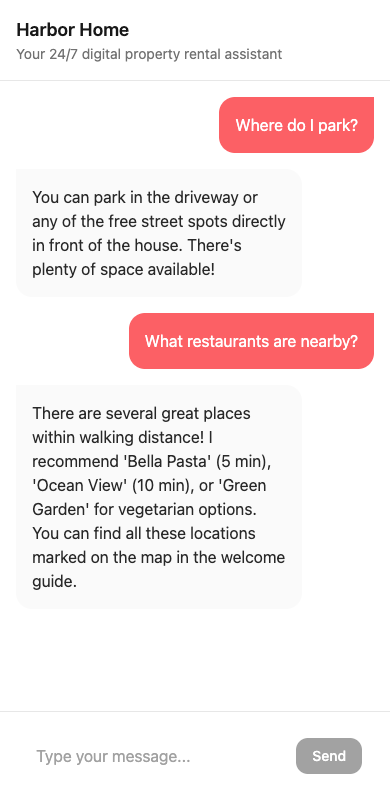
At a glance
- Setup
- Start with an Airbnb listing URL or enter your property details manually.
- Guest experience
- A separate web chat for questions about the property.
- Host responsibilities
- Review the source material, handle exceptions and keep booking-related communication in the booking channel.
Give the assistant the answers you usually type
Start with the messages you find yourself sending every week. Where do guests park when the driveway is occupied? What does the first person at the property do if the gate is closed? Is the sofa bed ready to use, or are the sheets in a cupboard? Write the answer you would give a first-time visitor and add a second sentence for the most common exception.
An Airbnb listing can give you a starting point. The details that help during a stay are often different from the descriptions that sell the stay. Add the practical information yourself and compare it with the house manual template. Keep reservation-specific details, such as a one-time entry code, in the approved channel for that reservation.
What the guest chat can handle
| Guest asks | What to include in your property notes |
|---|---|
| “Which parking bay is mine?” | Bay number, entrance landmark, overflow instructions |
| “Where are the spare towels?” | The exact cupboard or shelf and any exceptions |
| “Can I leave at noon?” | The standard checkout time and how to request an exception from the host |
| “The lock won't open. What now?” | The approved contact route and the safe fallback you already use |
Use the chat for property questions and keep Airbnb Messages for reservations, payments, changes and approvals. Check the platform's rules for your use case before sharing any external guest resource. Airbnb's off-platform policy explains the rules for contacting guests, links and required apps.
Test it the way guests will use it
Try your guest chat link on a phone outside the host account. Ask the same question two ways, then ask for a detail you left out on purpose. If a reply is ambiguous or confidently supplies a missing detail, clarify the notes and test again. Aim to leave each guest with either the next practical step or a clear way to reach you.
How to get started
- Add the property
Paste an Airbnb listing URL or select manual entry. Review the resulting property details.
- Fill in the gaps
Add guest-facing notes about arrival, amenities and house rules, plus the right way to reach a person.
- Test and share
Open the guest link on a phone, check sample replies and share it only where your booking channel permits.
Frequently asked questions
Does this send automatic replies inside Airbnb Messages?
The assistant replies in a separate guest web chat. Airbnb offers scheduled quick replies inside its own inbox.
Do I need to sign in to Airbnb to add a property?
You can start with a listing URL or enter the property details manually. A listing import provides a starting point that hosts should review.
Can a guest ask for a late checkout?
The chat can explain the standard checkout time and how to ask. The host should confirm any exception directly.
Can I use the assistant for direct bookings?
You can enter property details manually and share the guest chat link through the communication channel you use for confirmed bookings.
Related guides
- Automated Guest Messaging for Vacation Rentals
Answer routine guest questions automatically in a dedicated property chat. Learn when to use AI auto-replies, scheduled messages or a personal response.
- Import an Airbnb Listing into The Guest Guide
Use an Airbnb listing URL as a starting point for a guest assistant, then review the imported details and add practical stay instructions.
- Airbnb Quick Replies vs. The Guest Guide
Compare native Airbnb quick replies and scheduled messages with question-driven answers in the separate The Guest Guide property chat.
- Vacation Rental Check-in Instructions Template
Copy check-in instructions for confirmed guests, with arrival time, parking, the correct door, a private code delivery line and a fallback.